

Compare budgeting, expense tracking, account aggregation, and recurring-cost tools by the job they solve.
Finance Apps Compared by Features, Cost, and Best Fit
Compare the main types of finance apps, understand the job each one does best, and choose a workflow you can realistically maintain.
No credit card for the website check. Secure bank connection through Plaid is used in the app when you want automatic transaction insights.
Why People Choose Vala
Check Android, iOS, pricing, and shared-finance support before committing to setup.
Look beyond feature count to the weekly workflow you will actually use.
Use Vala when you want budgeting, spending insights, recurring costs, bills, goals, and split expenses in one mobile app.
Who This Helps Most
People deciding whether they need a focused budgeting app or a broader personal finance app.
Users comparing connected-account automation with manual planning control.
Couples or households that need clearer shared-expense tracking without losing personal visibility.
Start with the job you need a finance app to do
Finance apps can look similar in an app store while solving different problems. A budgeting app helps assign money to categories, an expense tracker explains where money went, and a subscription tool focuses on repeat charges. Broader personal finance apps combine several of those jobs.
Choose the narrowest tool that solves your real problem without creating another weekly chore. If you need budgets, transaction categorization, bills, subscriptions, savings goals, and split expenses together, compare the full workflow rather than one isolated feature.
Account aggregation and transaction categorization
Connected accounts can reduce manual entry, but coverage, refresh timing, and category accuracy vary. A useful app should show when data was last updated, let you correct categories, and provide a manual path when a connection is unavailable.
Vala supports optional Plaid-connected account data for automatic insights while retaining manual planning flows. Available credit should not be treated as cash, and incomplete information should be identified rather than silently presented as a complete picture.
Recurring expenses, subscriptions, and shared money
Recurring expenses deserve more than a list. Look for renewal visibility, bill reminders, and a practical path to review a charge. For couples or roommates, also check whether the app supports split expenses and makes each person's responsibility understandable.
Vala brings recurring-cost review into the same workflow as budgets, bills, goals, and split expenses. Users still decide what to keep, change, or remove; the app does not promise savings or cancel services automatically.
Compare cost and ease of use together
A free app is not automatically the best value, and a paid app is not automatically more useful. Compare the current trial or subscription terms with the time saved, the clarity of the result, and whether the app replaces another tool.
Pricing and features can change, so confirm current terms in the provider's app store listing or official product page. The strongest choice is the app whose core workflow fits your habits and produces a useful decision quickly.
Install Vala and Start Today
Return to the Vala homepage for full product details, or jump directly to the download section.
Latest Budgeting Guides
New practical money-management articles you can apply right away.
Vacation Savings Plan: Save for Your Trip Step by Step
Build a vacation savings plan in six steps: set a trip number, pick a date, automate transfers, and find the leaks that fund it....
Read GuideHow to Reconcile Bank Transactions: A Step-by-Step Guide
Learn how to reconcile your bank transactions step by step: match statement lines, handle pending items, ATM cash and shared expenses, and catch errors...
Read GuideHow to Split a Rideshare Fare With Friends
Split an Uber fare in the app, settle a Lyft ride afterward, and avoid the fee and tip traps. Steps, a worked example, and...
Read GuideBenefits of AI Budgeting with Vala
Faster category decisions
AI insights highlight where to adjust spending before month-end pressure builds.
Stronger savings consistency
Keep savings goals and progress visible while you adjust spending decisions.
Clear shared-money workflows
Split bills and track household expenses with practical visibility and reminder support.
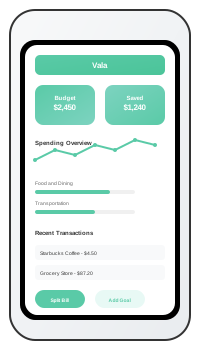
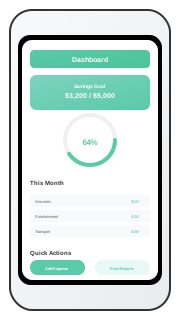
Vala App Screenshots
Which Type of Finance App Fits Your Goal?
| App type | Best for | Typical strengths | Main tradeoff |
|---|---|---|---|
| Budgeting app | Planning how money should be used | Categories, targets, and spending limits | Requires regular plan maintenance |
| Expense tracker | Understanding where money went | Transaction history and categorization | May explain the past without guiding the next action |
| Subscription tool | Reviewing repeat charges | Recurring-charge visibility and renewal review | Usually narrower than a full money plan |
| Personal finance app | Managing several money jobs together | Connected accounts, budgets, bills, goals, and reporting | More setup and features to evaluate |
| Vala | Turning spending data into a practical next step | Budgets, connected or manual tracking, recurring costs, bills, goals, FutureMe, and split expenses | Best fit for users who want an action-led mobile workflow |
FAQs for This Topic
A budgeting app focuses on planning and category limits. A broader finance app may also aggregate accounts, categorize transactions, track recurring costs, monitor bills, and support goals.
Connected accounts reduce entry work, while manual tracking gives direct control. The right choice depends on your coverage, privacy preferences, and how often you are willing to update the app.
It can help when it supports shared or split expenses and keeps responsibilities clear. Confirm the exact collaboration model before choosing an app.